网站GMC被封,很可能是你的网站这个地方出问题了?
今年很惨,Facebook广告账号经常抽风,Google那边Google merchant centre(GMC)_被封的厉害。
这年头,有钱都打不了广告。
难。
没办法,出了事只能一个个排查,比如GMC,排查的条件无非就是
- 网站的内容和广告是不是相一致,符合?
- 条款条约都清晰了吗?
- 有没有违约产品?
- 广告是否扩大,内容是否造假?
但排查来排查去,我去,我们发现有一点可能没有排查到,那就是你的这个网站的货币可能没有及时的转换。
在Google广告进行审核时,审核人员在不同的国家,因此网页就会显示不同的货币。
而我们上传feed时所设置的国家是美国,对应的货币应该是USD。由于审核人员所在国家不同就可能导致所看到的货币与期待的货币不符合。
因此我们想通过在提交的URL中增加参数,用来指定网页显示的货币(USD),避免上述情况发生。
这会直接导致你的网站过不了审核!

没想到吧。
那怎么办呢?
解决方法
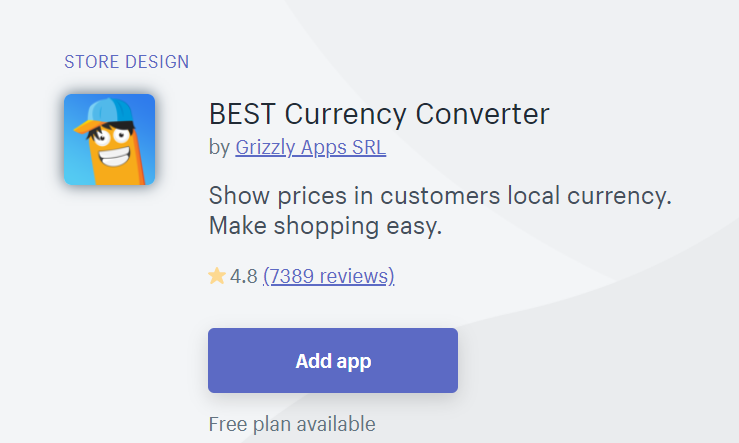
在网站安装了BEST Currency Converter这个app后,网页可以根据当前用户location设置对应的货币单位。
如:location在欧洲国家,货币单位会自动转化为EUR,
链接地址:
https://apps.shopify.com/doubly-currency-converter
如下图所示:
实现步骤:
打开shopify后台
依次点击
Setting
General
Store
currency
Change
formatting
修改前两个输入框的内容(删除<span class="money"></span>标签)
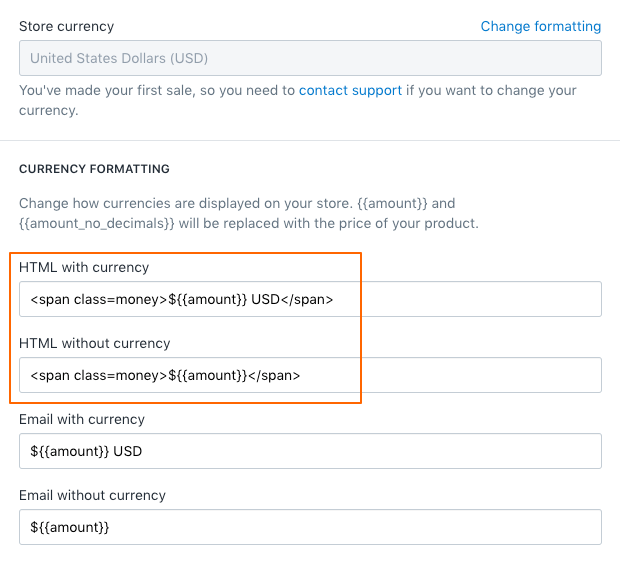
修改前
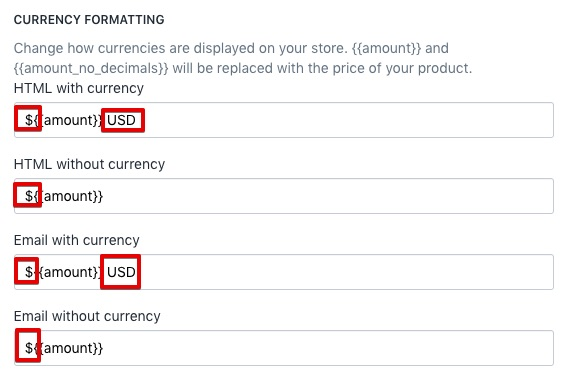
修改后
打开shopify后台
依次点击
Online Store -- Actions -- Edit Code -- 搜索并打开product-meta.liquid
目标位置1:
搜索ProductMeta__PriceList Heading来确定目标位置。
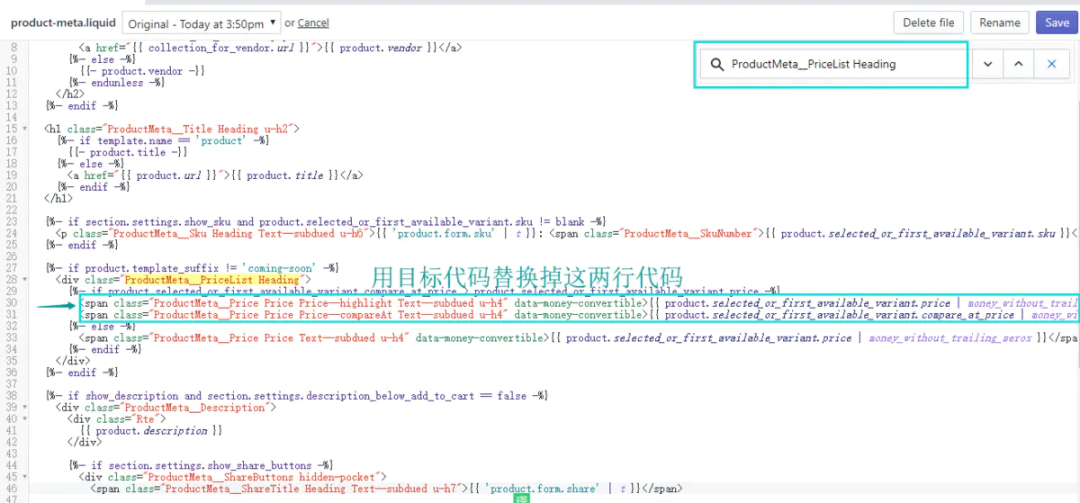
目标位置1
目标代码1:
<span class="ProductMeta__Price Price Price--highlight Text--subdued u-h4" data-money-convertible>
<span class="ad_money">{{ product.selected_or_first_available_variant.price | money_without_trailing_zeros }}</span>
<span class="money">{{ product.selected_or_first_available_variant.price | money_without_trailing_zeros }}</span>
</span>
<span class="ProductMeta__Price Price Price--compareAt Text--subdued u-h4" data-money-convertible>
<span class="ad_money">{{ product.selected_or_first_available_variant.compare_at_price | money_without_trailing_zeros }}</span>
<span class="money">{{ product.selected_or_first_available_variant.compare_at_price | money_without_trailing_zeros }}</span>
</span>
用目标代码替换所在代码
打开shopify后台 ,依次点击
Online Store -- Actions -- Edit Code
搜索并打开product-item.liquid
目标位置2:
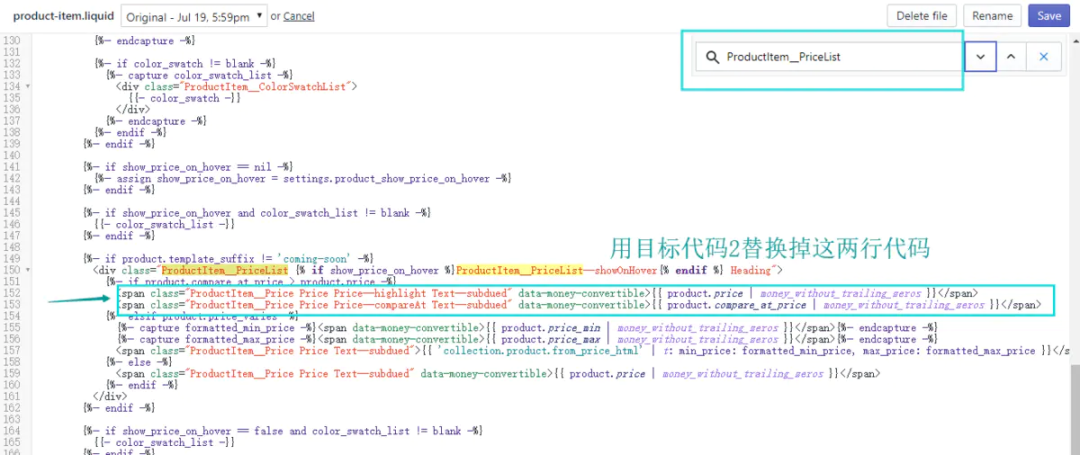
目标位置2
目标代码2:
<span class="ProductItem__Price Price Price--highlight Text--subdued" data-money-convertible>
<span class="ad_money">{{ product.price | money_without_trailing_zeros }}</span>
<span class="money">{{ product.price | money_without_trailing_zeros }}</span>
</span>
<span class="ProductItem__Price Price Price--compareAt Text--subdued" data-money-convertible>
<span class="ad_money">{{ product.compare_at_price | money_without_trailing_zeros }}</span>
<span class="money">{{ product.compare_at_price | money_without_trailing_zeros }}</span>
</span>
打开shopify后台
依次点击Online Store -- Actions -- Edit Code
搜索并打开custom.js
将目标代码3复制粘贴于该文件底部即可:
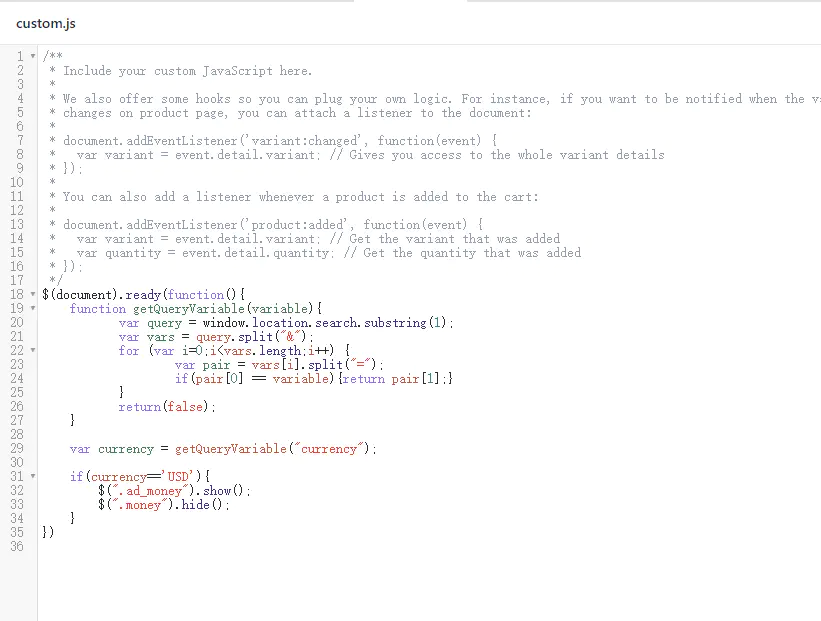
粘贴于底部即可
目标代码3:
$(document).ready(function(){
function getQueryVariable(variable){
var query = window.location.search.substring(1);
var vars = query.split("&");
for (var i=0;i<vars.length;i++) {
var pair = vars[i].split("=");
if(pair[0] == variable){return pair[1];}
}
return(false);
}
var currency = getQueryVariable("currency");
if(currency=='USD'){
$(".ad_money").show();
$(".money").hide();
}
})
打开shopify后台,依次点击
Online Store -- Actions -- Edit Code
搜索并打开theme.scss.liquid
将目标代码4复制粘贴于该文件底部:
.ad_money{
display:none;
}
测试步骤:
点击进入任一产品详情页,选择除USD外任一货币,观察网页中货币是否改变。
如改变,在当前链接后增加参数?currency=USD,观察详情页当前产品货币单位是否为USD,如果是,证明以上代码修改成功。
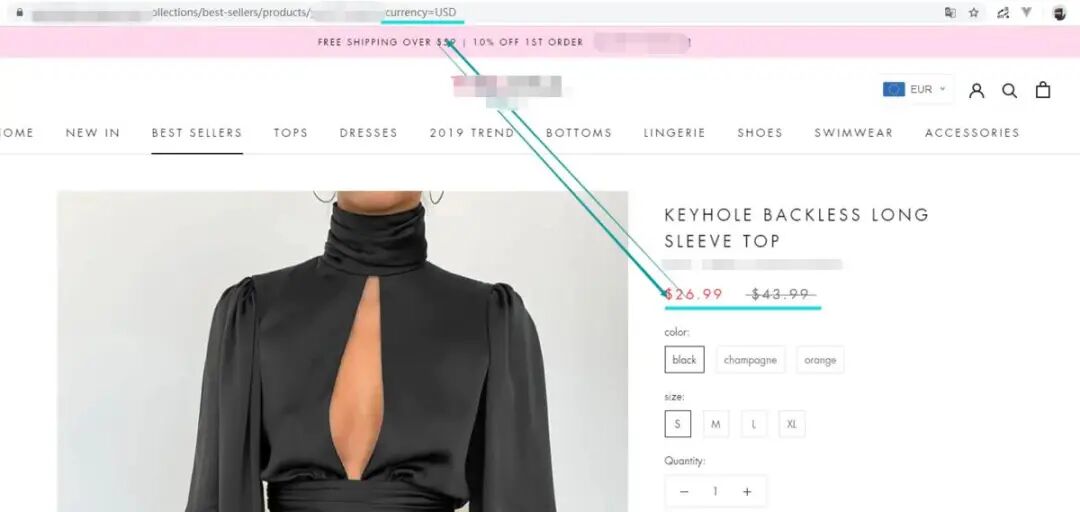
怎么样关于货币的转化问题,从而导致审核不过关,进而导致的GMC被封,这点有注意到吗?
看不懂???
叫你们技术过来~~
以上!
-----------------------
公众号:小北的梦呓(ID:xiaobeishare)
博客:www.guxiaobei.com
B站:小北的梦呓

微博:小北的梦呓长按下图二维码关注,你将感受到一个有趣的灵魂,且每篇文章都有惊喜。